Google Cloud Services
CS544: Big Data Systems
Taught by Prof. Caraza-Harter

Overview
This project uses four Google Cloud services to analyze a Wisconsin schools dataset. Work is done in a Jupyter notebook on a cloud VM, data is uploaded to a GCS bucket, Dataform creates the pipeline into BigQuery, and BigQuery answers analysis questions.
- Create a VM on a public cloud and connect through SSH.
- Create a GCS bucket and upload data.
- Build a Dataform pipeline from GCS to BigQuery.
- Write BigQuery queries with geographic data operations.
Part 1: Virtual Machine Setup
Launch VM
- Launch/manage VMs: Compute instances.
- Choose machine type
e2-medium. - Use Ubuntu 24.04 LTS public image, x86/64 (not Arm64), boot disk size 25 GB (README notes estimate near $25/month).
- No special firewall changes are required for 544.
- Configure SSH keys for laptop access: VM SSH key metadata.
- Optional quota setup: IAM quotas.
GitLab Access from GCP VM
The README states SSH auth to GitLab is only enabled from machines on the same network (for example CSL VM). For Google VM workflows, use HTTPS cloning and set a strong GitLab password.
Jupyter Setup
Create a venv and install required packages:
sudo apt install python3-venv
python3 -m venv venv
source venv/bin/activate
pip3 install jupyterlab google-cloud-bigquery google-cloud-bigquery-storage bigquery-magics pyarrow tqdm ipywidgets pandas matplotlib db-dtypes pandas-gbq google-cloud-dataform google-cloud-storage
Start JupyterLab:
python3 -m jupyterlab --no-browser- Set up SSH tunnel and connect from browser.
- Paste Jupyter token from terminal when prompted.
- Create
src/p8.ipynb(10 questions are answered there).
Authentication
Grant VM permission to access BigQuery:
gcloud auth application-default login --scopes=openid,https://www.googleapis.com/auth/cloud-platformCautions from the README
- If multiple Google accounts exist in browser, use incognito and sign into the intended account.
- Keep Jupyter locked down; exposing VM/Jupyter can expose your cloud resources.
- If you see "Reauthentication is needed", rerun the login command.
When done working, revoke permissions:
gcloud auth application-default revokePart 1 Questions
- Q1: In a cell starting with
#q1, read/etc/os-releaseand output the string as the cell result (no print). - Q2: Use Python
subprocessto runlscpuand output captured string.
Part 2: GCS Bucket
- Create a private bucket in Google Cloud Storage.
- Bucket name must be globally unique.
- Location: Multi-region, us (multiple regions in the United States).
- Use pyarrow GCS filesystem: pyarrow.fs.GcsFileSystem.
- Read local
wi-schools-raw.parquetbytes and write to bucket with pyarrow.
Part 2 Questions
- Q3: Return a Python list of top-level paths in bucket.
- Q4: Return modification time of
wi-schools-raw.parquetin nanoseconds.
Part 3: Dataform
Create private BigQuery dataset p8 with location US, then build a Dataform workspace.
Dataform Setup Steps
- Open BigQuery.
- Open Dataform in left menu.
- Create repository.
- Choose any repository ID; region
us-central1. - Click "Grant all".
- Create development workspace and open it.
- Initialize workspace.
- Set
workflow_settings.yaml:defaultLocation: US,defaultDataset: p8.
Required Service Account Roles
In IAM, update Dataform Service Account roles to include:
BigQuery AdminBigQuery Job UserDataform Service AgentStorage Object Viewer
Pipeline Code Requirements
Create three .sqlx files on VM and upload them from notebook via dataform.DataformClient.write_file(...). Compile using create_compilation_result.
wi_counties.sqlx: materialize Wisconsin counties frombigquery-public-data.geo_us_boundaries.counties(FIPS 55).schools.sqlx: useLOAD DATA OVERWRITEto create<YOUR_PROJECT>.p8.schoolsfrom GCS parquet. Config must includetype: "operations"andhasOutput: true.wi_county_schools.sqlx: geographic join producing all school columns pluslocation(ST_GEOGPOINT) andcounty_name, using Dataform refs like${ref('wi_counties')}and${ref("schools")}.
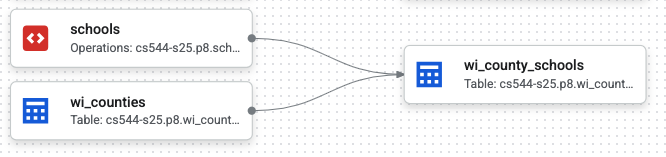
wi_counties, schools, and wi_county_schools.Part 3 Questions
- Q5: Query
wi_countiesfor county count. - Q6: Count public schools from
wi_county_schoolswhereagency_typeis "Public school". - Q7: Return dependency dictionary for Dataform actions.
Q7 expected format example:
{'schools': [],
 'wi_counties': [],
 'wi_county_schools': ['schools', 'wi_counties'],
 ...}
Q7 hint snippet from README:
response = df_client.query_compilation_result_actions(
    request={"name": compilation_result_name}
)
Part 4: BigQuery
- Q8: Return dictionary of school counts per county.
- Q9: Number of Q8-style queries before BigQuery free tier is exhausted (rounded down integer).
- Q10: For each public middle school in Dane County, return nearest public high school in Dane County.
Q8 Example Output
{'Milwaukee': 420, 'Dane': 217, 'Waukesha': 177, 'Brown': 123,
 'Outagamie': 96, 'Rock': 72, 'Marathon': 72, 'Racine': 68,
 'Winnebago': 65, 'Sheboygan': 63, 'La Crosse': 59, 'Kenosha': 56,
 'Washington': 56, 'Walworth': 56, 'Fond du Lac': 55, 'Eau Claire':
 54, 'Jefferson': 52, 'Dodge': 51, 'Wood': 47, 'Manitowoc': 44,
 'Sauk': 42, 'Columbia': 41, 'Barron': 40, 'Grant': 39, 'Portage': 38,
 'Ozaukee': 38, 'Clark': 38, 'Waupaca': 36, 'St. Croix': 35,
 'Chippewa': 35, 'Calumet': 30, 'Shawano': 29, 'Pierce': 29,
 'Marinette': 29, 'Vernon': 29, 'Polk': 28, 'Monroe': 28,
 'Trempealeau': 27, 'Juneau': 26, 'Green': 23, 'Dunn': 22, 'Oconto':
 20, 'Lafayette': 18, 'Door': 18, 'Douglas': 18, 'Crawford': 17,
 'Oneida': 17, 'Iowa': 16, 'Lincoln': 16, 'Washburn': 16, 'Green
 Lake': 15, 'Kewaunee': 15, 'Richland': 14, 'Langlade': 13, 'Taylor':
 13, 'Vilas': 13, 'Sawyer': 13, 'Waushara': 13, 'Ashland': 12,
 'Bayfield': 12, 'Buffalo': 11, 'Rusk': 11, 'Marquette': 10,
 'Jackson': 10, 'Price': 9, 'Burnett': 9, 'Pepin': 7, 'Forest': 7,
 'Menominee': 4, 'Adams': 3, 'Florence': 3, 'Iron': 3}
Q10 Example Output
{'Badger Ridge Middle': 'Verona Area High', 'Badger Rock Middle':
'West High', 'Belleville Middle': 'Belleville High', 'Black Hawk
Middle': 'Shabazz-City High', 'Central Heights Middle': 'Prairie
Phoenix Academy', 'Cherokee Heights Middle': 'Capital High', 'De
Forest Middle': 'De Forest High', 'Deerfield Middle': 'Deerfield
High', 'Ezekiel Gillespie Middle School': 'Vel Phillips Memorial High
School', 'Glacial Drumlin School': 'LaFollette High', 'Glacier Creek
Middle': 'Middleton High', 'Hamilton Middle': 'Capital High', 'Indian
Mound Middle': 'McFarland High', 'Innovative and Alternative Middle':
'Innovative High', 'James Wright Middle': 'West High', 'Kromrey
Middle': 'Middleton High', 'Marshall Middle': 'Marshall High', 'Mount
Horeb Middle': 'Mount Horeb High', 'Nikolay Middle': 'Koshkonong
Trails School', "O'Keeffe Middle": 'Innovative High', 'Oregon Middle':
'Oregon High', 'Patrick Marsh Middle': 'Prairie Phoenix Academy',
'Prairie View Middle': 'Sun Prairie West High', 'River Bluff Middle':
'Stoughton High', 'Savanna Oaks Middle': 'Capital High', 'Sennett
Middle': 'LaFollette High', 'Sherman Middle': 'Shabazz-City High',
'Spring Harbor Middle': 'Capital High', 'Toki Middle': 'Vel Phillips
Memorial High School', 'Waunakee Middle': 'Waunakee High', 'Whitehorse
Middle': 'Monona Grove High', 'Wisconsin Heights Middle': 'Wisconsin
Heights High'}
For Q10, README suggests using MIN_BY instead of MIN.
Q10 Debug Distance Example (km)
{'Badger Ridge Middle': 1.8392052150991804, 'Badger Rock Middle':
5.29072039608733, 'Belleville Middle': 0.0, 'Black Hawk Middle':
3.2208653727303473, 'Central Heights Middle': 0.0, 'Cherokee Heights
Middle': 3.0891335611917463, 'De Forest Middle': 0.7104369448866054,
'Deerfield Middle': 0.0, 'Ezekiel Gillespie Middle School':
0.20996167824816614, 'Glacial Drumlin School': 8.422858770109299,
'Glacier Creek Middle': 10.380886949942708, 'Hamilton Middle':
1.6888876951751441, 'Indian Mound Middle': 0.3181930065207676,
'Innovative and Alternative Middle': 0.0, 'James Wright Middle':
3.099031509318725, 'Kromrey Middle': 0.633645628693037, 'Marshall
Middle': 0.3692934702053087, 'Mount Horeb Middle': 0.2247088214705937,
'Nikolay Middle': 2.7825509153862193, "O'Keeffe Middle":
1.1801078611747235, 'Oregon Middle': 2.199089113737385, 'Patrick Marsh
Middle': 2.995356862757154, 'Prairie View Middle': 1.4469952774362715,
'River Bluff Middle': 1.491373618930982, 'Savanna Oaks Middle':
7.439620069162148, 'Sennett Middle': 0.1614363991779063, 'Sherman
Middle': 0.0, 'Spring Harbor Middle': 3.0043175181011414, 'Toki
Middle': 3.9513342414992176, 'Waunakee Middle': 0.23741587309479018,
'Whitehorse Middle': 2.252781418278708, 'Wisconsin Heights Middle':
0.0}
Submission
Commit and push to GitLab. Required structure:
<your p8 repository>
└── src
    ├── definitions
    │   ├── wi_counties.sqlx
    │   ├── schools.sqlx
    │   └── wi_county_schools.sqlx
    └── p8.ipynb
After finishing, revoke cloud access credentials:
gcloud auth application-default revokeTesting
README testing section says to ensure autobadger version 0.1.21 before running tests:
autobadger --info
autobadger --project=p8 --verbose
More testing details: projects.md.
SSH Keys Reference
The p8 folder also includes an SSH key guide: ssh-keys.md.
- Default key pair paths:
~/.ssh/id_rsaand~/.ssh/id_rsa.pub. - Generate keys with
ssh-keygenwhen needed. - For non-default keys, specify private key explicitly with
ssh -i.
ssh -i <path-to-your-private-key> <remote-host-address>
ssh -i <path-to-your-private-key> <username>@<remote-host-address>
License
Distributed under the MIT License. SeeLICENSE.txt for more information.